Can You Sell a Kids’ Coloring Book on Amazon? How to Make One for KDP
Oct 18, 2026 · Rey Midas · Rules from KDP’s help pages
Yes, you can sell a kids’ coloring book on Amazon. You publish it through Amazon KDP as a regular paperback: an interior PDF, a cover, a Reading Age and up to three categories. KDP charges nothing to publish and prints each copy when it sells. What makes a kids’ book different is the line art, the age you set and the characters you can’t use. This guide covers all three, with real pages drawn for two age bands.
Draw a free kids’ coloring page here
One click draws a real line-art page in about 15 seconds. Change the theme or style if you like. Free, no signup.
Know what you want already? Make the full book (10–30 pages + cover, $9.99) →
1. Pick one age band; it decides the line art
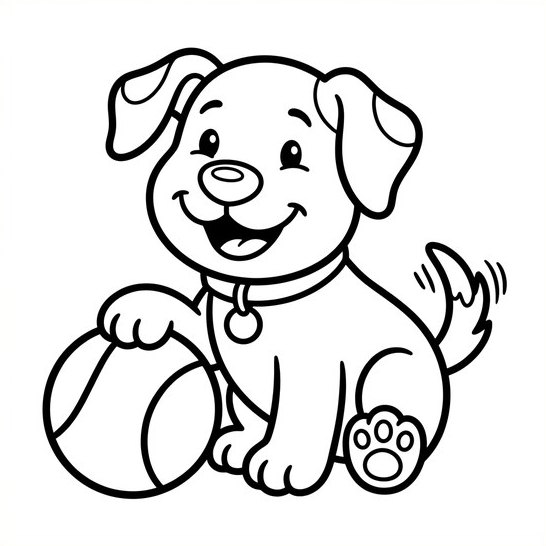
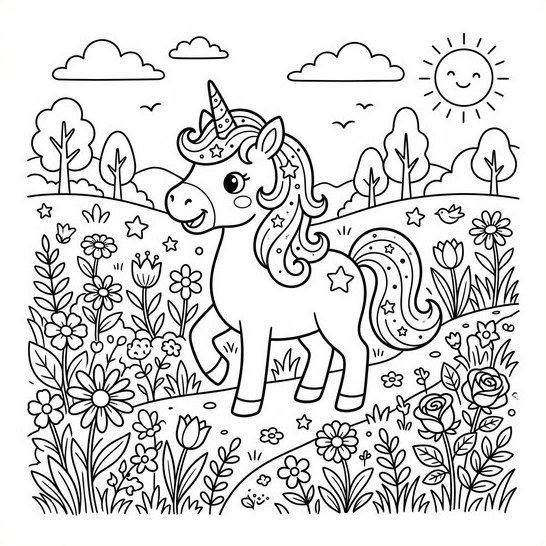
A coloring book for a three-year-old and one for an eight-year-old are different products. Young kids color with fat crayons and can’t stay inside small shapes; older kids want scenes with something to find in them. Pick one band per book and draw every page for it. These two pages came out of the same generator with two different styles:
| KDP Reading Age | What the pages need | Themes that fit |
|---|---|---|
| 3–5 | One big subject, thick outlines, little or no background | Farm animals, dinosaurs, trucks, fruit |
| 6–8 | A scene: a character plus background, medium lines, more small parts | Unicorns, ocean life, space, princesses, monster trucks |
| 9–12 | Detailed scenes and patterns, close to an adult book | Animals in patterns, fantasy worlds, sports |
KDP’s Reading Age menu also has 0–2. Before you aim a book at toddlers, read the U.S. CPSC’s children’s book FAQ: its testing exemption for ordinary paper books does not cover books meant for children 3 or younger.
2. Pick a theme you own
Parents search Amazon by subject: “dinosaur coloring book for kids”, “truck coloring book ages 4–8”. A clear subject plus an age in the title is the whole pitch. What you can’t sell is someone else’s character. KDP doesn’t allow books that violate copyright or trademark and can ask you to prove you hold the rights, so Bluey, Paw Patrol, Pokémon and Disney princesses are out unless you have a license. Your own friendly dinosaur is fine; theirs is not.
3. Draw the pages, then check each one
Whether you draw by hand, with ChatGPT or with a generator, reject any page with:
- Gray shading or filled black areas. Kids want shapes to color, not a finished picture.
- Areas too small for a crayon in a 3–5 book. If you can’t color it with a fat crayon, simplify it.
- Gaps in the outlines. A broken line turns one shape into a confusing one.
- Text or a border. Image tools garble letters, and a frame prints crooked after trimming.
- Thin, faint lines. KDP’s floor is 0.75 point; a kids’ book needs much bolder lines than that to read clearly on its paper.
- Anything scary or odd for the age: a strange face or extra limbs is a one-star review from a parent.
Images must be at least 300 DPI at their printed size. If you use ChatGPT, the ChatGPT coloring book guide has the prompt and the resolution fix.
4. Lay out the interior
- 8.5 × 11″ is the usual size for kids: big pages for small hands, at the same print cost as an 8.5 × 8.5″ book.
- One drawing per sheet, blank back. Markers bleed through, and kids tear pages out.
- A title page (“This book belongs to:”) is expected in kids’ books.
- At least 24 pages, KDP’s paperback minimum. 11 drawings plus a title page and blank backs is exactly 24; parents get more for their money at 20–30 drawings.
5. Set it up on KDP
| KDP field | What to do for a kids’ coloring book |
|---|---|
| Low-content book | Leave it unchecked. KDP lists coloring books and children’s books as “not generally low-content”. A regular paperback also keeps the free KDP ISBN and Expanded Distribution. |
| Reading Age | Optional on the form, but set it: without a suitable one, KDP says the book may not be eligible for the Children’s categories. |
| Categories | Up to 3. Pick children’s coloring and activity categories; KDP may remove a category that doesn’t fit the book. |
| Sexually explicit content | Required question. Answer No; Yes makes the book ineligible for Children’s categories. |
| AI-generated content | If an AI tool drew the pages or the cover, say so. KDP requires disclosure of AI-generated images, cover included. |
| New titles per week | KDP allows 2 new titles per book format per week, so plan a series in pairs. |
6. Price it at $9.99
KDP pays 60% of the list price minus printing at $9.99 and up, and 50% below it. An 8.5 × 11″ black-ink book of 24–110 pages costs $2.84 to print, so it earns $3.15 per Amazon.com sale at $9.99 and $2.15 at $9.98. The full table is in KDP coloring book royalties.
Type one theme and pick Bold & Easy (thick lines, big shapes, like the puppy) or Kids (cartoon scenes, like the unicorn). The Coloring Book Machine draws 10 to 30 pages, each a new scene, adds a title page and blank backs, and gives you an 8.5 × 11″ interior PDF for KDP plus front-cover art. You still look the pages over before you upload. $9.99 per book, no subscription, and a free sample page on the machine before you pay.
Make my kids’ coloring book →Questions
Can you upload a kids’ coloring book to Amazon?
Yes. Kids’ coloring books are published through Amazon KDP as paperbacks, the same way as any other book. You upload an interior PDF and a cover, set a Reading Age, choose up to 3 categories and price it. KDP charges nothing to publish; printing comes out of each sale.
Is a kids’ coloring book a low-content book on KDP?
Usually not. KDP’s own examples list coloring books and children’s books as “not generally low-content”, so publish it as a regular paperback. Low-content books also can’t use the free KDP ISBN or Expanded Distribution, and without an ISBN they show no sample.
What Reading Age should I pick for a coloring book?
The band the pages are drawn for: 3–5 for thick, simple single-subject pages, 6–8 for cartoon scenes with more detail. KDP says a book without a suitable reading age may not be eligible for the Children’s categories. If you aim at 0–2, read the CPSC’s children’s book FAQ first: its testing exemption for ordinary paper books does not cover books meant for children 3 or younger.
Can I sell AI-generated coloring books for kids on Amazon?
Yes. KDP accepts AI-generated images but requires you to disclose them when you publish, and that covers interior pages and the cover. The pages must not use characters or brands you don’t own: KDP doesn’t allow books that violate copyright or trademark.
Can I use Bluey, Paw Patrol or Disney characters?
No, not unless you own the rights or have a license. KDP’s rules forbid content that violates copyright or trademark, and it can ask you to prove you hold the rights. Draw your own dinosaurs, unicorns and trucks instead.
How many pages should a kids’ coloring book have?
KDP’s paperback minimum is 24 pages. With one drawing per sheet and a blank back, 11 drawings plus a title page is 24 pages; 20–30 drawings is a fuller book for parents. An 8.5 × 11 black-ink book of 24 to 110 pages costs the same to print.
How much does a kids’ coloring book earn on Amazon?
At $9.99 an 8.5 × 11 black-ink book of 24–110 pages earns $3.15 per Amazon.com sale (60% of the price minus $2.84 printing). At $9.98 it earns $2.15, because the rate drops to 50% below $9.99.
Related
- How to Sell AI Coloring Books on Amazon KDP (rules, niches, steps)
- How to Make a Coloring Book With ChatGPT (prompt, resolution fix, layout)
- Can You Make a Coloring Book With Gemini, Claude or Perplexity?
- How Much Do KDP Coloring Books Make? Royalty per sale at every price
- Best AI Coloring Book Generators for KDP, compared by price and license
- Free KDP cover calculator (cover size, spine width, template)